Stop Losing Leads — Track Every First Touch with UTM Shortcodes
Know exactly where your leads come from. No coding. No guesswork. No hidden fees.
The Problem: You’re Getting Leads — But From Where?
Let’s say you’re sharing your website link on different platforms—like Instagram, LinkedIn, WhatsApp, or through emails. People click on your link, visit your site, and some of them even fill out a form or make a purchase. But here’s the problem:
You don’t really know which platform brought them in. Was it the Instagram post? The LinkedIn ad? Or the email you sent last week? Without this information, it’s hard to tell what’s actually working in your marketing.
The Solution: UTM Master Tracks the First Click That Counts
That’s where UTM Master helps.
It tracks the first place someone came from when they landed on your site. Even if they click around and visit different pages before signing up or buying something, UTM Master remembers where they started. So, you always know which platform or campaign brought in each lead. This helps you make smarter decisions about where to focus your time, money, and marketing efforts.
See and Use Your UTM Data in Seconds

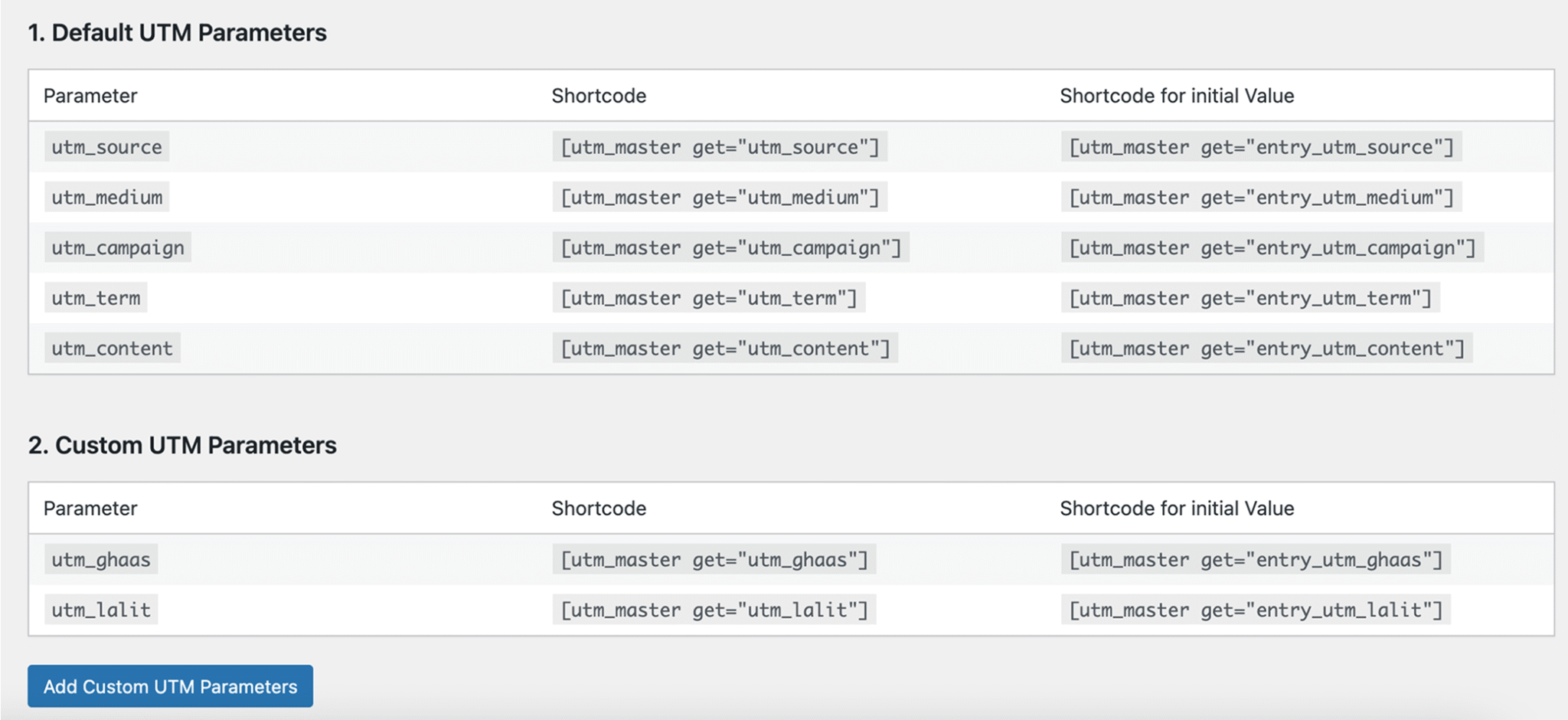
Easily Access Your UTM Tracking Data with Simple ShortcodesThis screen shows a list of UTM parameters—both standard ones like source, medium, and campaign, and custom ones you’ve added yourself. Each parameter comes with a ready-to-use shortcode, so you can quickly display either the latest or the first recorded value anywhere on your website without needing to write code.
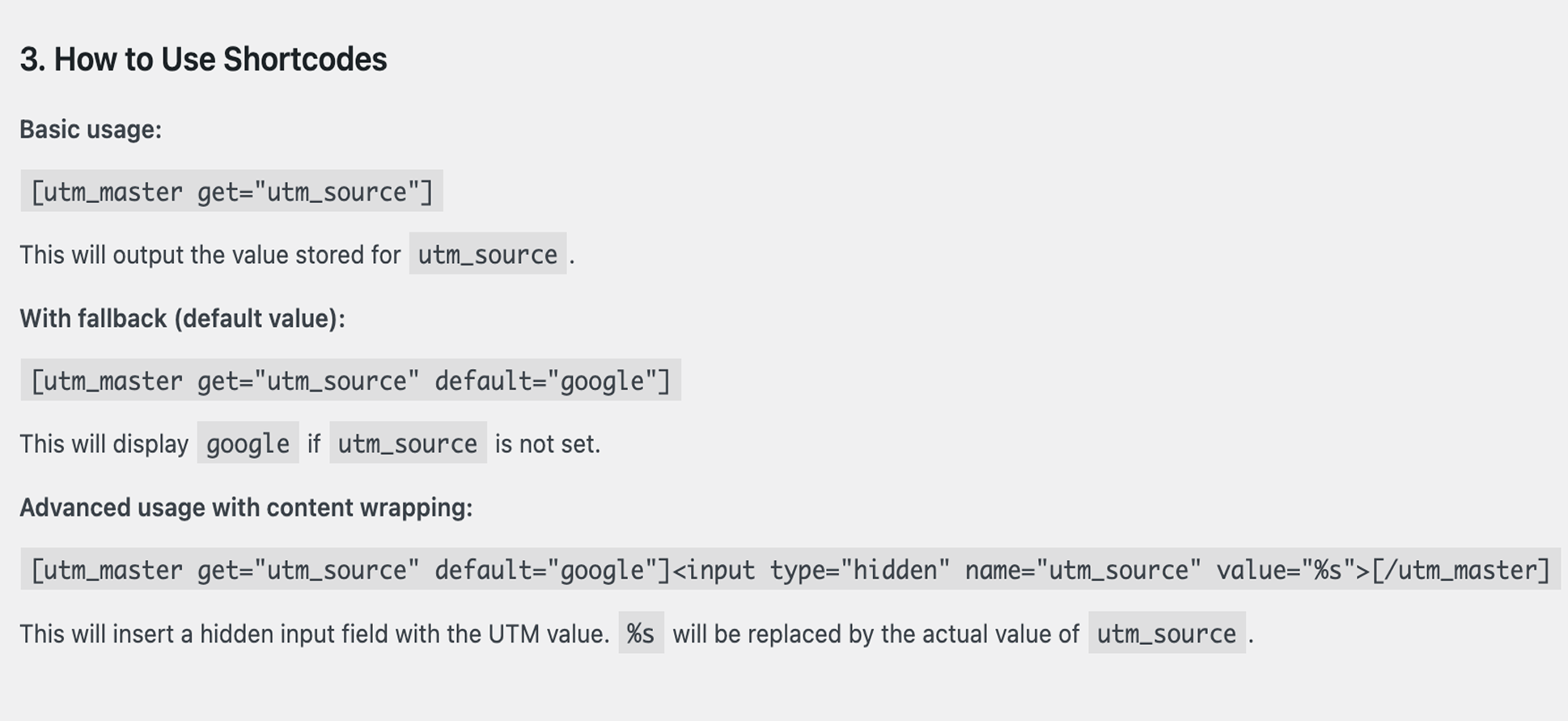
Simple Ways to Display Your UTM DataThis section shows how you can use shortcodes to pull in your UTM values on your site. You can display the value directly, set a backup value in case it’s missing, or even wrap it inside other content—like a hidden field in a form—without touching any complicated code.
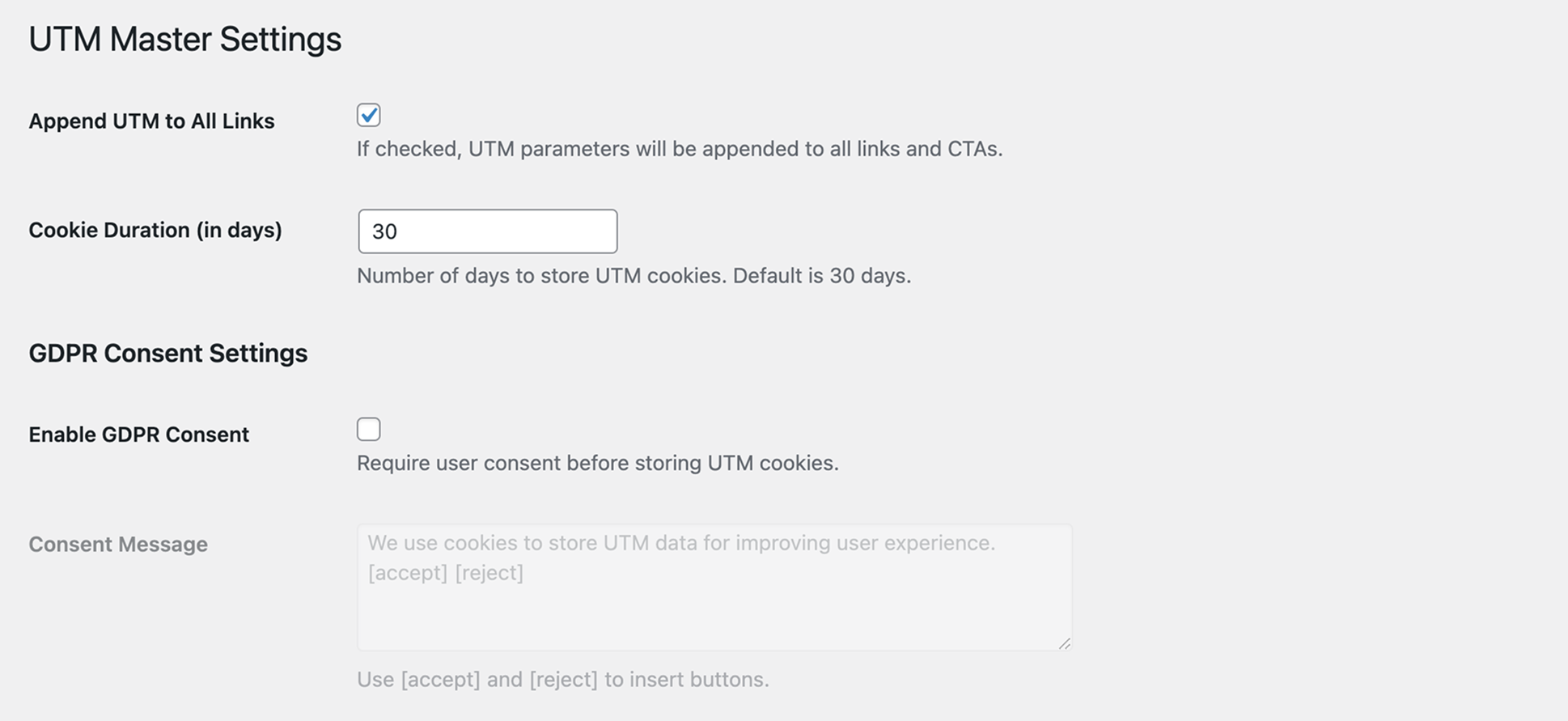
Control How Your UTM Data is Stored and SharedThis section lets you decide how your tracking data works on your site. You can choose to automatically add UTM tags to all your links, set how long the data should be saved, and even enable a consent message so visitors can agree before their information is stored—helping you stay transparent and privacy-friendly.

What Sets Our Tracking Apart
Precision-driven insights. First-touch attribution. Zero guesswork.
UTM Master gives you everything you need to track campaigns accurately — without technical hassle or hidden limitations.
Here’s what makes it different:
Define & Manage Custom UTM Parameters
Create your own UTM tags to match your marketing structure and reporting needs.
Auto-Append UTMs to URLs
Say goodbye to manual UTM tagging — links are automatically tracked as users click.
Supports Consent-Based Cookie Tracking
Fully GDPR-compliant, with UTM tracking that respects user consent.
Access Cookie Data via Shortcode
Use a simple shortcode to retrieve and display UTM values anywhere on your site.
Capture & Retain First-Touch UTM Data
Track the original source a visitor came from — even if they visit multiple pages before converting.
Custom Cookie Duration
Set how long UTM data stays in cookies — ideal for longer decision journeys.
| Feature | UTM Master | Most Free Tools | Premium Plugins |
|---|---|---|---|
| First-Touch Tracking | (Paid) | ||
| Custom UTM Tags | (Limited) | ||
| Shortcode Support | |||
| Custom Cookie Duration | (Paid) | ||
| GDPR Compliant | (Basic) | ||
| Auto URL Tagging | |||
| Form Tool Integration | Or limited | (Paid) | |
| Plug & Play |
Universal Compatibility Across Your Stack
Built to plug into any workflow. Our UTM tracking and attribution layer integrates seamlessly with your existing tools — forms, websites, CRMs, and more — without breaking your flow.
What Our Users Say
Real feedback from marketers and developers who trust UTM Master for smarter campaign tracking.
FAQs – Everything You Need to Know
Quick answers to common questions about setup, tracking, privacy, and customization.
What exactly does the UTM Master plugin do?
UTM Master helps you keep track of where your engagement and traffic are coming from. It picks up UTM tags from your links—like utm_source or utm_campaign—and remembers them, so you can easily use that info in your forms and see which marketing efforts are actually working.
Will it work with my form plugin (like Contact Form 7)?
Yep! It works smoothly with Contact Form 7, WPForms, Elementor Forms, and most major form plugins. You can drop UTM values right into hidden fields using a simple shortcode—no coding needed.
What if someone lands on the site without UTM tags? Can I show a default value?
Absolutely. You can set a fallback value that shows up if the UTM isn’t present.
For example:
This way, you’re never left with blank data.
Does it save UTM info across pages?
It does! UTM Master stores those UTM values in cookies, so even if someone clicks around your site, the info stays with them. Great for tracking multi-step journeys or longer sessions.
Can I use it inside input fields in my forms?
Yes, and it’s super handy. You just wrap your form input like this:
<input type=”hidden” name=”utm_source” value=”google”>
That %s gets replaced with the actual UTM value.
Is it privacy-friendly? (What about GDPR?)
Totally. It doesn’t collect or send any personal data. Everything is stored locally in cookies—so you’re covered on the privacy front.
Can I track my own custom UTM tags too?
For sure! You’re not limited to just the usual UTM parameters. If you’re using custom ones like ad_type, source_id, or anything else—you can track those too.
If someone clicks through a few pages, will the UTM info still stay?
Yes! Once someone lands on your site with UTM tags in the URL, UTM Master remembers them—even if they browse around. That way, you don’t lose track of where they came from.
How long does UTM Master remember the info?
By default, it stores the UTM details for 30 days. But you’re in control—you can change the duration in the settings to make it shorter or longer.
Is it going to slow down my site?
Not at all. UTM Master is super lightweight and works quietly in the background. You won’t even notice it’s there—and neither will your visitors.
Will this work with WooCommerce, like on product or checkout pages?
For sure. UTM Master works across your entire WooCommerce setup. Whether someone’s on a product page, in the cart, or at checkout—you can track the whole journey.
What if I want to actually show the UTM info on the page?
Super easy! Just use a shortcode like this:
And if you want to customize how it looks in your content or layout, you can wrap it in HTML and use %s to drop in the value wherever you like.
Is my data secure and private?
Absolutely. Your data is 100% yours — we don’t store, access, or share any of it. Everything stays on your systems, fully under your control. There’s no third-party tracking, cloud storage, or hidden data syncs. Only you have access, always.